The Writing Studio That Actually Reads Your World
Built for fiction authors whose worldbuilding got bigger than the book. The Legendry, the editor, the outline, and the publishing pipeline — all in one desktop app you own outright. Purchase, install, keep.
Chapter 3: The Crossing
The wind cut through the mountain pass like a blade drawn across steel. Kira pressed forward, her boots finding purchase on the frost-slicked stone. Below, the lights of Ironhold flickered like dying stars.
She had three hours before the Rebellion's forces reached the eastern gate. Three hours to find the Stormforge and get out before anyone knew she was there.
The guard at the watchtower shifted, his lantern swinging in a slow arc. Kira counted the rhythm — four seconds of light, eight seconds of shadow. Enough.
The Editor Is the Whole App
Most writing tools put the document in the middle and stack tools around it. This one does the opposite. Your manuscript is the thing everything else is built to serve. Your world is one keystroke away, and ProseGuard is watching the line you just wrote.
Entity highlighting, document sidebar, real-time word count, and ProseGuard status — all visible while you write.
- TipTap v3 Engine
- 0 extensions, all picked for fiction specifically. Structural formatting, entity-aware inline styles, and a command palette that actually fits a 100,000-word manuscript.
- Slash Commands
- Type
/for quick actions. Headings, callouts, dividers, entity mentions, character sheets. The command palette lives inside the writing flow itself, so you're not breaking out of the prose to click into a side panel every time you want to restructure a paragraph. - Entity Recognition
- Characters, locations, factions, items, color-coded inline as you write. Type
@to pull any entry straight from your Legendry. - Bubble Menu
- Select any text and a contextual toolbar rises with it. Formatting, entity linking, comment threads, and ProseGuard overrides — all one click away without leaving the prose.
Focus & Typewriter Mode
Strip the UI down to nothing but the prose. Typewriter mode keeps the active line at the center of the screen so your eyes stop chasing the cursor down the page.
Find & Replace
Regex search across the active document with preview highlighting. Replace one match at a time, or sweep the whole manuscript in one pass when you finally decide how to spell that character's name.
Real-Time Statistics
Word count, character count, reading time, and progress bars tied to your chapter and scene targets. Always in the status bar, never a popup.
Auto-Save
Configurable debounce. Every keystroke tracked. The document saves silently in the background with crash recovery built in, because losing work to an unsaved document in 2026 is unforgivable.
A Filing System That Fits a Novel
Folder hierarchy, semantic search, status tracking, and import/export. The kind of setup a 300,000-word project actually needs once the folder of alphabetical filenames stops cutting it.
- Folder Hierarchy
- Unlimited nesting with drag-and-drop. Reorganize chapters, move documents between folders, or scope the tree down to a single book inside a series.
- Hybrid Search
- Type under 3 characters and you get an instant local substring filter. Type more and it kicks over to meaning-based semantic search. Finds documents by what they're about, even when you can't remember the exact words.
- Status Workflow
- Five color-coded states: Draft, In Progress, Revision, Done, Published. Visible as dots on every document. Filter the whole library by status with one click when you want to see only the scenes still screaming for attention.
- Import & Export
- Pandoc-powered round-trip. Bring in or export to PDF, DOCX, Markdown, HTML, and plain text. Your manuscript structure survives the round-trip, which cannot be said for most of the tools in this space.
Seven Levels of Narrative Hierarchy
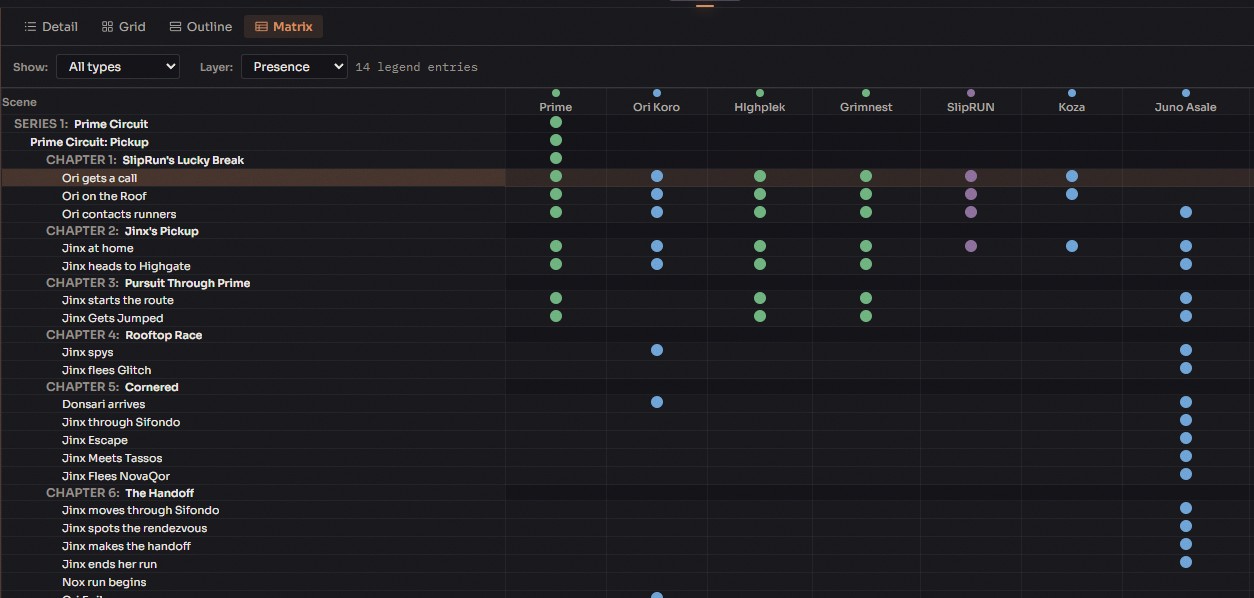
Series, Book, Part, Act, Chapter, Scene, Beat. Plan at whichever level the current problem actually lives on. Every node carries word count, POV, linked documents, and entity references with it, so moving a scene around doesn't lose the context attached to it.
- 4 View Modes
- Detail view when you're editing one scene. Grid view when you want a card-based overview. Reading mode when you want to see the story flow as a reader would. Matrix view when you need to cross-reference entities against scenes.
- POV Tracking
- 0 types of point-of-view including First Person, Deep Third, Stream of Consciousness, and Unreliable Narrator. Assigned per scene or beat, because most long-form fiction doesn't stay in one POV the whole way through.
- Document Linking
- Every outline node links to the manuscript document under it. Word count progress bars show completion against your targets at a glance, so you know which scenes are finished and which are still the one-line notes you wrote three months ago.
- Entity References
- Manual tagging, plus automatic detection from the linked documents themselves. Which means you can see which characters appear in which scenes without having to open every single file and hunt for names.
Five Sequential Editing Phases
From first messy draft to ready-to-publish. Each phase does one specific job, and the module tracks which phase every document is in, so you don't lose your place in a 300,000-word project that's been through the mill a few times.
Severity-coded issues, entity references, source citations, and one-click status management. Every issue is actionable.
- 1 Baseline
- Import or snapshot. The unedited starting point every subsequent phase compares against. Without this, differential analysis has nothing to differ from.
- 2 Developmental Edit
- Structural analysis run across the entire manuscript. Pacing, arc coherence, character consistency. The phase produces an editorial letter with ranked action items, which is roughly what a real developmental editor would hand you after a first pass.
- 3 Line Edit
- Sentence-level polish. ProseGuard rules fire against every line, rhythm analysis runs, dialogue tags get audited, and WorldSpell lore checks run alongside. The line edit is where prose quality actually improves.
- 4 Copy Edit
- Grammar, punctuation, and style guide enforcement. Chicago Manual of Style and AP Style are built in, though you can also set up a custom per-project guide if your series has conventions neither one covers.
- 5 Proofread
- The final deterministic consistency scan. Spelling variants, punctuation inconsistencies, capitalization drift. It produces a Publishing Readiness Score across four weighted categories, which is less about gamification and more about giving you a real answer to "is this actually ready to ship."
The Creative Tools Behind the Writing
Every module reads from your Legendry. Your world is the single source of truth, so there's no syncing and no copying entries into a second app.
Legendry
The worldbuilding database everything else in Ishvana reads from. Twelve entry types, relationship graphs, voice profiles, and search that works on meaning instead of matching keywords.
Maps
Pins, polygons, polylines, typography labels. Click a city on the map and you get the faction running it, the language they speak, and the chapter they first appeared in.
Publish
Five book templates. Six platform presets. Front matter, back matter, lore appendices. Compiles to print-ready PDF without Atticus or Vellum in the middle.
Character Knowledge
Track what each character knows, and when they learned it. The matrix view catches a character referencing something they shouldn't know yet, before a reader writes to tell you.
ProseGuard
Your style rules, applied the same way every time. Scope them per project, per document, per scene, or per character. If a villain is supposed to speak in fragments, the villain speaks in fragments.
Magic System
Define stats, formulas, and dice. Compute probability curves. Works for soft magic, hard magic, superhero powers, cyberware, cultivation tiers, or rulebook stat blocks, whatever structured system your fiction runs on.
Visual Studio
Asset boards for reference art, character portraits, and media. Organize by folder, link images to lore entries, filter by type. All local, no cloud sync you didn't ask for.
Lorekeeper
Consistency checking done with actual anomaly detection underneath. Catches continuity errors and slow lore drift in projects long enough to grow either.
Analytics & Research
Writing streaks, session tracking, word count goals, and a built-in research browser with bookmarks that don't get lost in 400 Chrome tabs.
Hawken
The writing coach agent. Hawken reads your Legendry, your voice profiles, and your prose rules, then helps you polish the lines you wrote. Style analysis, copy-edit passes, line-level suggestions. Your book stays yours.
Chat
Multi-thread conversations with intent-routed local agents. @-mention any lore entity to pull it into the conversation. Writers' Room runs Ishvana, Hawken, and Lagan in parallel when you want three angles at once.
Councils
Structured local council sessions with fixed specialist rosters. World, Character, and Creative councils run handler rounds, then produce reports and drafts you can accept, edit, or reject.
Timeline Studio
Chronological timelines with swimlane views. Custom fantasy calendars, because 365-day Earth years don't fit every world. Event relationships and character arc tracking included.
Plot Studio
Hierarchical plotlines, six beat sheet frameworks, character arcs. Chekhov's gun tracking and Sanderson's promises so you can actually see which foreshadowing you paid off and which you forgot about.
Language Studio
A conlang workbench. Phoneme inventories, grammar rules, morphology. Generate words from your phonology, tune them by hand, and keep the ones that sound like the language you're actually building.
World Knowledge
Real-world fact-checking against your world's axioms. If your setting has no copper, it flags the copper kettle before a reader writes to you about it. Wikipedia integration included.
Etherforce
The Divinity Engine dispatch layer underneath it all. Bundled local handlers, dispatch logs, benchmarks, source attribution, and zero provider setup or per-message cost.
Every Feature Reads from the Same World
The Legendry is the single source of truth. Entity detection knows who your characters are. ProseGuard knows how they speak. Character Knowledge tracks what they'd even be able to say in the scene you're writing. The whole app is built backwards from that one premise.
Legendry
Build your world. Characters, locations, factions, magic systems, history. Structured entries the rest of the app can actually read and search against — the kind of database a wiki tab of loose notes can't replace.
Entity Detection
Ishvana reads your prose and tags every character, place, and concept you mention. Without you having to stop and tell it who anyone is.
Character Knowledge
Track what each character knows, and when they learned it. The module catches the violations before your readers do.
ProseGuard
Your writing rules, applied automatically. Scoped per project, document, scene, or character. If one character speaks in fragments, they speak in fragments.
Hawken
When you want a second read, Hawken pulls from everything above. Line-level suggestions, style analysis, and copy-edit passes grounded in your world — not drafts written on your behalf.
The Stack, in One App.
The typical fiction author has 0 tools open on any given writing day. Ishvana swaps the whole stack for one desktop app. No subscriptions, no copy-pasting between browser tabs, no half your lore stuck in a Google Doc you can't search from Scrivener.
Your current stack
- Scrivener, Word, or Google Docs Writing & manuscripts
- World Anvil, Campfire, or Notebook.ai Worldbuilding wiki
- Plottr, Aeon Timeline, or Scrivener Outline & timelines
- Grammarly, ProWritingAid, or AutoCrit Prose style checking
- Atticus, Vellum, or Draft2Digital Book formatting & export
- Pinterest, Milanote, or ArtStation Visual reference boards
- Notion, Campfire, or OneNote Character tracking & notes
- Google Scholar, Wikipedia, or Zotero Research & references
- D&D Beyond, AnyDice, or Roll20 Magic systems & probability
Five subscriptions. Four file formats. And half your lore lives in a Google Doc you can't search from anywhere useful.
Ishvana
- TipTap v3 editor, 27 extensions, tuned for fiction
- Legendry: 12 entry types, relationships, meaning-based search
- Seven-level outline, four view modes, nine POV types
- ProseGuard rules scoped per project, document, scene, or character
- Five book templates, six platform presets, print-ready PDF
- Visual Studio asset boards, linked to the lore entries behind them
- Character Knowledge matrix that catches what your character shouldn't know yet
- Built-in research browser, bookmarks that survive, YouTube transcription
- Magic System tools with formulas, dice, and real probability curves
$99, once. Everything included. Your manuscript and your lore live on your own hard drive under your own roof.
Who This Is Actually For
Five ways the typical author ends up at Ishvana. Pick the one that sounds like the problem you're staring at today.
Your bible got bigger than the book.
Your world has three continents, nine factions, a magic system with rules, and somewhere in there is also a novel. The editor here is built for exactly that situation.
Epic SeriesFive books in and can't remember if it was Arlen or Arnen.
Multi-book continuity across half a million words is a memory problem dressed up as a writing problem. Ishvana's the one keeping track, so you can spend the attention on the prose.
MigratingScrivener was built in 2007 and it shows.
If you've outgrown it, the replacement is modern underneath. A real worldbuilding module, a modern editor tuned for fiction, and an import path that brings your project over without losing the folder structure.
Privacy-FirstYou don't want your manuscript in someone else's cloud.
Ishvana runs on your hard drive. Zero telemetry, zero cloud sync you didn't turn on. Your drive, your work, your rules.
Done SubscribingFive subscriptions to write one book is absurd.
Scrivener plus World Anvil plus Grammarly plus Plottr plus research tools adds up to real money, every year, forever. $99 once is the other option.
I built this because I needed it.
Writing a large fictional world has gotten harder every year I've done it. Not the prose part, mind you, but the bookkeeping. Which character knew what by chapter nine. Where in the world after a story arc. Where characters were across multiple books. Which spelling of a faction name I committed to two years ago. So I end up with five apps open at once, none of them connected, and a lore wiki that went out of date the moment I opened a new chapter.
At some point I gave up waiting for a tool that handled this the way I needed, and sat down to build one. That's what Ishvana is. It started off simple at first, but after that first prototype worked, it was over. I knew I could do it. Every feature in here exists because of a problem I ran into, usually more than once, on a manuscript that matters to me. Hoping that the developer might add a feature that wasn't in their vision.
There's no company behind this. No investors. No roadmap written by someone who's never written a book. Just one writer who got tired of a stack of apps and subscriptions, and an app that's been in daily use on his own fiction since the first version worked.
"I built the writing tool I needed."
One price. Everything in.
No subscription. No feature gates. You buy it once, you own it, every tool unlocked.
See Pricing & DetailsReady to Write?
$99, once. Every tool, every agent, and every update, included. No subscription. No feature gates. You bought it, you own it.
14-day money-back guarantee. Secure checkout via Stripe.