
WorldKnowledge
Every piece of speculative fiction has a contract with the reader about how different the fictional world is from the real one. Your fantasy novel assumes magic exists. Your sci-fi novel assumes FTL travel works. Your alternate history assumes Rome never fell. These are intentional departures from reality, and readers accept them as the price of entry to your fiction. What readers don’t accept is the unintentional departures — a character firing a revolver with nine rounds in the cylinder, a medieval siege that takes three days when historically it would have taken six months, a physics error that breaks the suspension of disbelief because your fiction wasn’t trying to break it. These kinds of errors are the ones authors rarely catch on their own because they require real-world knowledge the author may not have. WorldKnowledge is Ishvana’s system for catching them. It fact-checks your prose against Wikipedia, flags unintentional contradictions with real-world fact, and respects your intentional divergences via a system of world rules that tell the fact-checker “in this fiction, X is true” so it doesn’t flag magic as a factual error.
This page covers the full WorldKnowledge system — world rules management, the fact-check pipeline, the Wikipedia indexing and search, and the dedicated WorldKnowledge agent for interactive fact-checking questions.
World rules (axioms)
Section titled “World rules (axioms)”World rules are the declarations that tell the fact-checker “in this fiction, X is true even though X is not true in reality.” They’re the intentional contract between your world and the real one, and they matter enormously because without them, every fact-check would flood you with false positives against things you deliberately changed.
A guided questionnaire covering the most common ways fiction diverges from reality. For each category, pick an answer from a preset list or write a freeform explanation:
- Physics. Gravity level, faster-than-light travel, time travel, other physics exceptions.
- Astronomy. How many moons, what kind of star system, unusual celestial conditions.
- Magic. Whether magic exists, whether it overrides physics, whether it’s rare or common.
- Technology. Predominant tech level — pre-industrial, industrial, modern, post-singularity, anachronistic mix.
- Geography. Real-world geography or original fictional geography.
- Species. Whether non-human sentient species exist.
- Metaphysics. Afterlife beliefs, divine presence, supernatural framework.
Each question has typed answer options with optional freeform explanations for nuance. You can answer “yes” to “does magic exist” and then add a paragraph explaining what kind of magic, who can use it, and what constraints it operates under.
The preset questionnaire is the fastest way to set up basic world rules. For most projects, answering the questionnaire once takes ten minutes and covers 80% of the rules the fact-checker needs to respect.
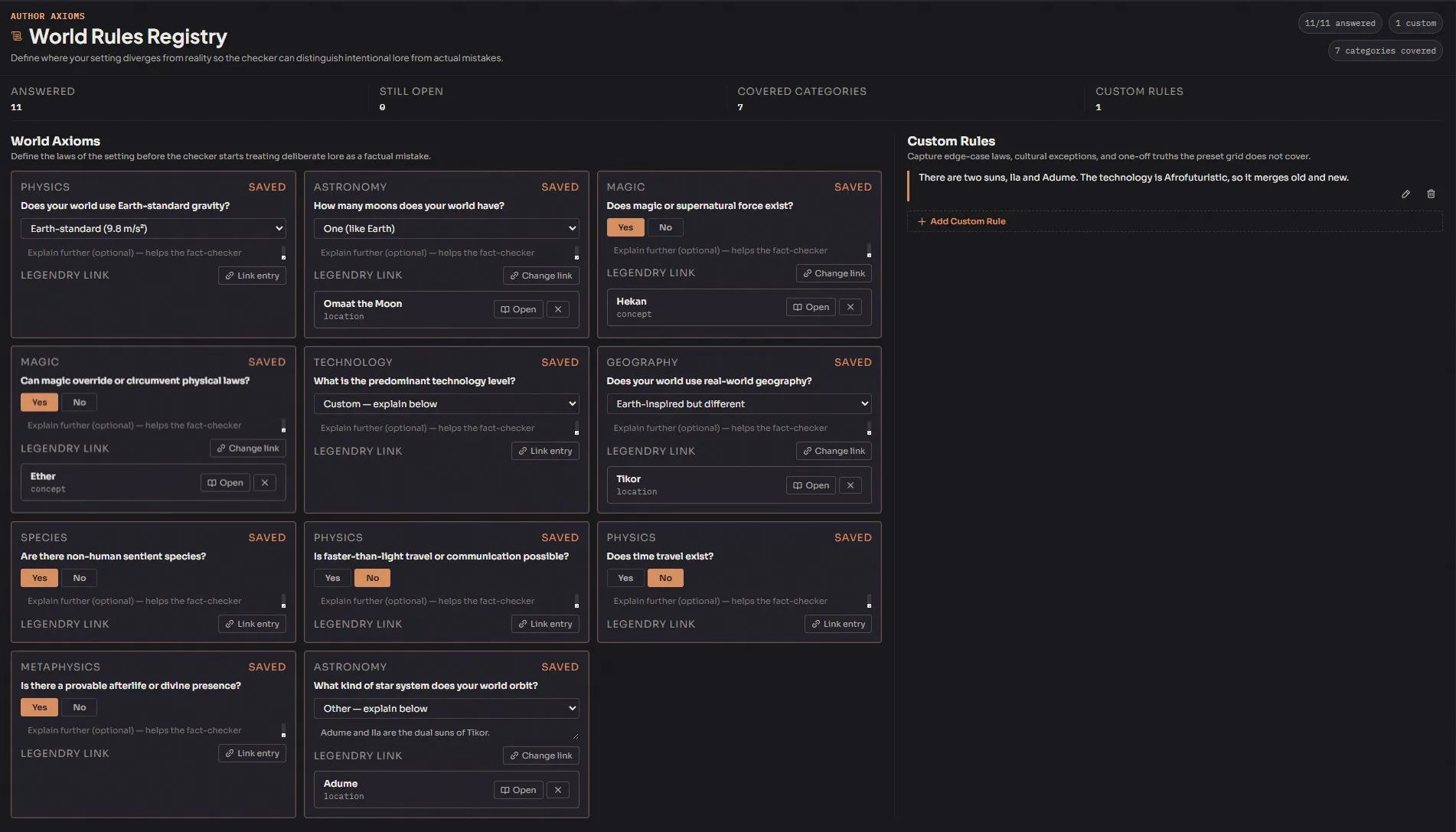
Beyond the preset questionnaire, you can add arbitrary custom world rules for anything that isn’t covered. Custom rules are freeform:
- Rule text. The declaration itself, in natural language. “Gravity on Aurelia is 0.7G.” “The Roman Empire never fell; it unified under a magic-using dynasty in 400 AD and still rules today.” “Horses on Tikor can travel 60 miles a day on rough roads.”
- Tags for categorization and filtering.
- Link to a Legendry lore entry for deeper narrative context. Useful when the rule references a specific piece of canon.
- Sort order for organization.
Custom rules are the escape hatch for anything the presets don’t cover. Most projects end up with 5-20 custom rules covering the specific divergences that matter for the story.
Both preset answers and custom rules are injected into the fact-check prompt automatically. The system uses them as context when evaluating claims, so a rule like “magic exists and can heal wounds faster than real-world medicine” means the checker won’t flag your prose about a magically-healed injury as a factual error.
Fact-check pipeline
Section titled “Fact-check pipeline”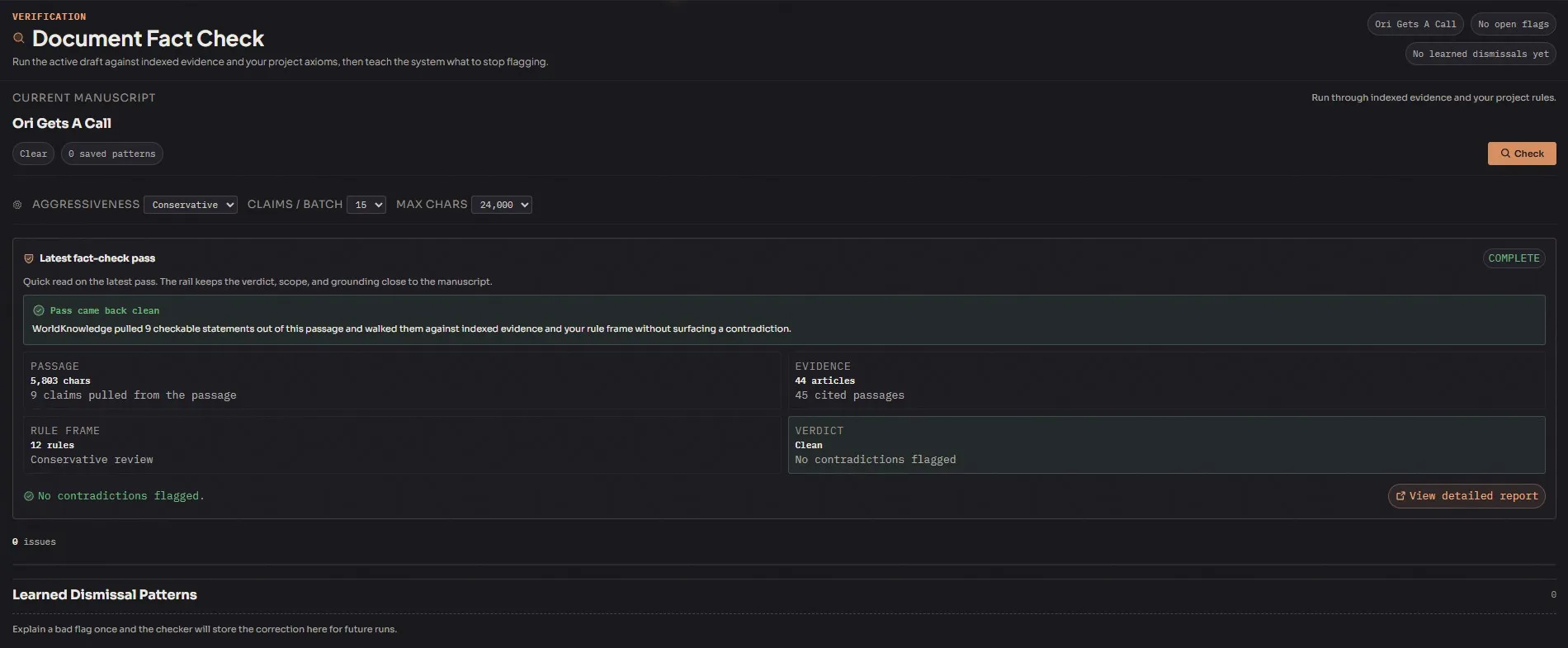
The fact-checker runs as a multi-stage pipeline:
- Claim extraction. The extractor reads your document text and identifies verifiable factual claims. Character names, plot events, magic systems, and fictional creatures get ignored — the extractor specifically looks for real-world-grounded claims like “the character loaded a revolver” or “they crossed the Alps in three days.”
- Evidence retrieval. For each claim, a keyword search against indexed Wikipedia articles pulls relevant passages.
- Claim verification. The verifier checks each claim against the Wikipedia evidence plus your world rules. A claim that contradicts Wikipedia but matches a world rule passes. A claim that contradicts both Wikipedia and your world rules gets flagged.
- Flag persistence. Violations are stored with the original sentence, the claim the checker extracted, the Wikipedia evidence (article title, passage, URL), and an explanation of why the claim was flagged.
The result is a structured list of issues you can review, each with a specific location in your prose, the specific claim at issue, the evidence that contradicts it, and enough context to decide whether to fix the prose or add a new world rule.
Dismissal and learning
Section titled “Dismissal and learning”Every flag can be dismissed with a reason. “Intentional for this story.” “Character is lying.” “Flashback to a character’s mistaken recollection.” The reason isn’t just for your records — it feeds the dismissal pattern learning so the system gradually stops flagging similar claims in future runs.
You can view and manage learned patterns from the WorldKnowledge tab. Delete a pattern to re-enable flagging for that category of claim if you change your mind.
Configurable settings
Section titled “Configurable settings”- Checker aggressiveness. Conservative, balanced, or aggressive. Conservative flags only high-confidence contradictions; aggressive flags everything remotely suspicious. Balanced is the default and the right choice for most projects.
- Claims per batch. 5 to 50, default 15. How many claims to verify per pass. Larger batches are faster but use more tokens per request.
- Extract max chars. 2,000 to 32,000, default 8,000. How much document text to process per extraction pass. Longer passes catch more claims but use more context window.
Wikipedia indexing and search
Section titled “Wikipedia indexing and search”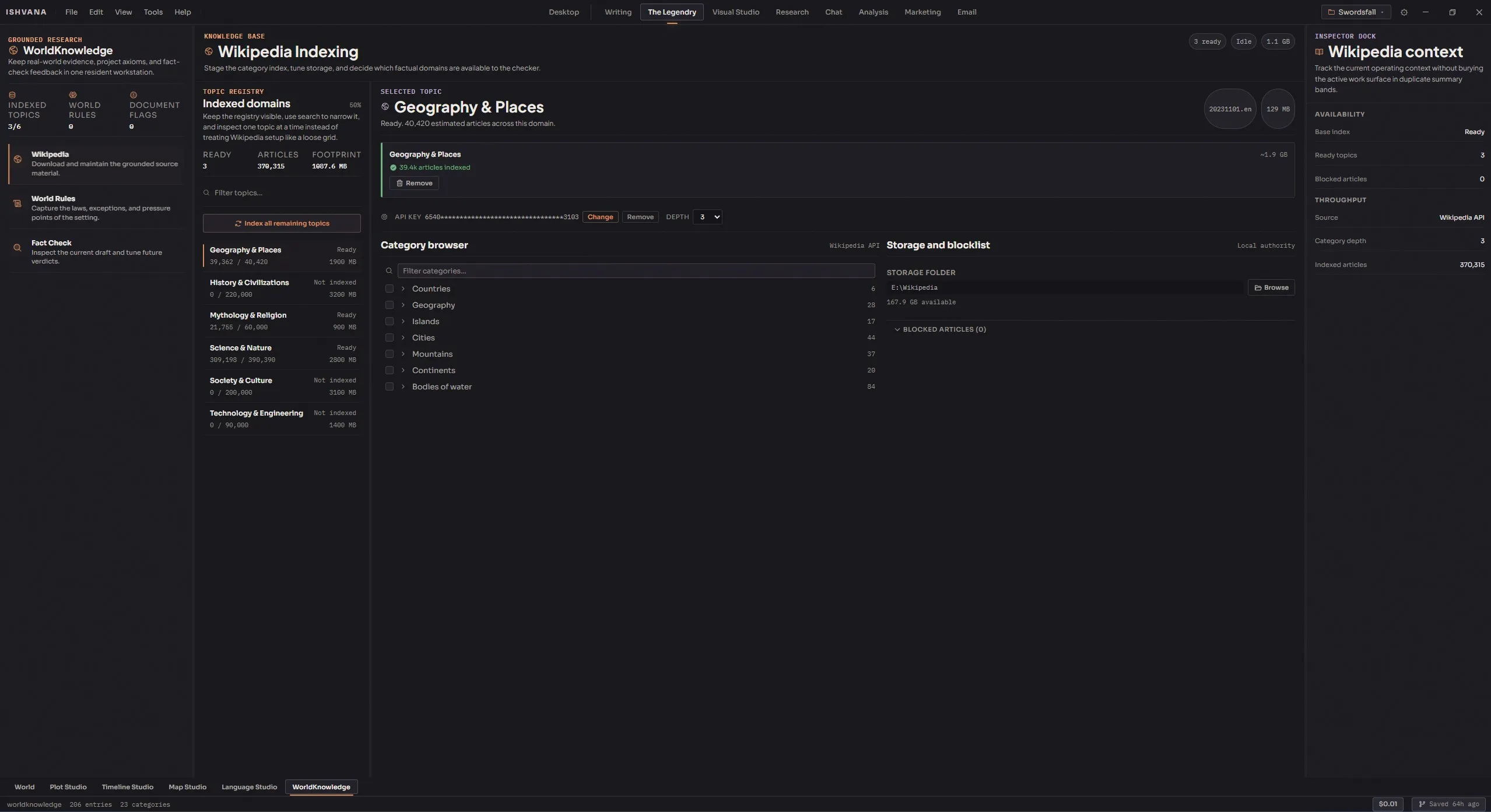
The fact-checker needs Wikipedia data to check claims against, and the Wikipedia module handles both the fetching and the searching.
How Wikipedia data works
Section titled “How Wikipedia data works”All Wikipedia data is fetched live via the MediaWiki API. No multi-gigabyte database dump downloads required. The data gets cached locally after fetching so future searches don’t re-fetch the same articles, but the initial pull is on-demand.
Topic downloads
Section titled “Topic downloads”Wikipedia content is organized by topic for efficient downloading:
- Science, History, Geography, Technology, Mythology & Religion, Society & Culture. Six top-level topics, each with its own download status.
- Browse available topics and see which have been downloaded.
- Download topics individually with a full text toggle — intros only (faster, lighter) vs. full articles (slower, more comprehensive).
- Delete topic data when no longer needed to reclaim disk space.
Most authors download the topics most relevant to their project. A historical fiction project downloads History, Geography, and maybe Society & Culture. A hard sci-fi project downloads Science and Technology. Fantasy projects often work fine with just Mythology & Religion plus History.
Category tree browsing
Section titled “Category tree browsing”Beyond the topic system, you can browse Wikipedia’s category hierarchy directly:
- Browse Wikipedia’s category hierarchy starting from root categories.
- Lazy-load child categories on expand.
- Checkbox selection for targeted category downloads.
- Search and filter within the tree.
This is more granular than topic downloads — useful when you need a specific subset of Wikipedia content (say, “19th century naval battles”) without pulling the entire History topic.
Search
Section titled “Search”Once Wikipedia content is indexed, the search supports two modes:
- Keyword search on article chunks for fast text matching.
- Semantic search for re-ranking results by meaning rather than exact keyword match.
Results include article title, the relevant passage, URL, and a relevance score.
Blocklist
Section titled “Blocklist”Block specific articles from appearing in search results or fact-check evidence. Useful when the Wikipedia article on a topic is wrong or contains information your fiction deliberately contradicts and you don’t want the checker flagging against it. Unblock articles to restore them.
Settings
Section titled “Settings”- API key — optional Wikimedia API key for higher rate limits. Stored encrypted at rest.
- Category depth — 1 to 10. How many levels deep to explore the category tree when auto-downloading.
- Custom storage path — store Wikipedia data on a different drive. Useful if your main drive is running low and you have a spare disk for research.
The WorldKnowledge agent
Section titled “The WorldKnowledge agent”A dedicated agent available for freeform Q&A in the Chat module. Ask it:
- Real-world facts. “What’s the orbital period of Mars?” “How much does a medieval longbow weigh?” “What’s the effective range of a Civil War-era rifle?”
- World rule questions. “Does my world have faster-than-light travel?” “What did I decide about magic in this project?”
- Comparative questions. “How does my world’s gravity compare to Earth’s?” “Is my technology level more like 1750 or 1850?”
The agent can search Wikipedia, run fact-checks on specific prose, view your world rules, and search your Legendry. Your world rules are injected into every conversation turn, so the agent always knows your world’s intentional divergences from reality.
For the full agent documentation including its scope and limits, see Agents → WorldKnowledge.
A typical workflow
Section titled “A typical workflow”- Answer the preset questionnaire once — physics, astronomy, magic, technology, geography, species, metaphysics. Ten minutes.
- Add custom rules for anything the presets don’t cover.
- Download Wikipedia topics relevant to your project. History, Science, Mythology & Religion, whatever fits.
- Browse categories for any specific subsets you need beyond the top-level topics.
- Fact-check a document after drafting. Configure aggressiveness based on how strict you want the check, click run.
- Review flags. For each one, decide: is this a real error that needs fixing, or an intentional divergence I should add as a world rule, or a false positive I should dismiss?
- Dismiss false positives with reasons. The system learns and reduces future noise.
- Research via Wikipedia search or the WorldKnowledge agent when you need facts for a scene you’re about to write.