
Language Studio
Every fantasy author with a fictional world eventually hits the language question. Your characters speak something. Maybe you’ve been pretending they speak English the whole time, which is fine but can feel lazy in a serious secondary-world setting. Maybe you’ve been dropping a handful of made-up words into dialogue — “By the blood of Mawu!” “The kajira bow to their masters” — without any underlying structure, which is worse because attentive readers notice the inconsistency when your made-up words don’t follow any pattern. Or maybe you’ve decided to actually build a real conlang, which is extremely rewarding and also an enormous undertaking that very few tools support well. The Language Studio is Ishvana’s attempt to support it. It’s a full conlang workbench with phoneme inventories, phonotactic rules, grammar systems, a searchable lexicon, morpheme tracking, writing system configuration, language family trees, and agent-assisted word generation for when you need new vocabulary that sounds consistent with what you’ve already built. It’s not trying to compete with PolyGlot or ConWorkshop — those are specialized tools for linguists — but it’s substantially more capable than anything built into a writing tool, and it lives in the same place as your prose and your Legendry.
This page covers every part of the module, in roughly the order you’d build a language from scratch.
Language management
Section titled “Language management”A project can have multiple languages. Each one is its own entity with:
- Name and endonym — the name outsiders use for the language and the name the language uses for itself. “Italian” is the name; “Italiano” is the endonym. Both matter for worldbuilding.
- Description — narrative context. Who speaks it, where, when it originated.
- Status. Draft, active, extinct, or proto. Proto-languages are ancestor languages you’re using to derive modern daughter languages.
- Writing system. Configuration covered in its own section below.
- Word order. SOV, SVO, VSO, VOS, OVS, OSV, or free. English is SVO. Japanese is SOV. Klingon is OVS. Pick the one your language uses.
- Morphology type. Isolating, agglutinative, fusional, polysynthetic, or oligosynthetic. This is the shape of how your language builds words — whether words are made of many separate morphemes or just one, whether inflection fuses into single forms or stacks in predictable pieces.
- Phonotactic template. A syllable shape pattern like
(C)V(C)— optional consonant, vowel, optional consonant. This is the skeleton every word in your language has to fit. - Parent language. For language family hierarchies — set a parent to establish descent from a proto-language.
- Lore entry link. Automatically links to a Legendry entry so the language is searchable and taggable alongside the rest of your worldbuilding data.
Language family trees
Section titled “Language family trees”Build parent-child hierarchies to model language descent:
- Set a parent language to establish descent.
- View the full family tree as a recursive structure.
- Model proto-languages branching into daughter languages.
This matters more than it looks. A realistic fantasy world rarely has one language — it has a family of languages, historically related, with shared vocabulary and divergent sound changes. Setting up a proto-language and deriving two or three daughter languages from it produces vocabulary that feels authentic because the same root word exists in both, slightly different, the way “brother” and “frater” are both descendants of the same Indo-European root.
Phonology
Section titled “Phonology”The foundation of every conlang.
Phoneme inventory
Section titled “Phoneme inventory”Define the sound system of your language:
- Symbol. IPA notation by default, but any custom notation works.
- Romanization. A readable Latin-alphabet mapping for each phoneme, so you can write the language without having to type IPA characters every time.
- Type. Consonant or vowel.
- Consonant features. Manner (plosive, nasal, trill, tap, fricative, affricate, and more), place (bilabial, alveolar, velar, glottal, and more), voicing (voiced, voiceless).
- Vowel features. Height (close, mid, open), backness (front, central, back), roundedness (rounded, unrounded).
- Diphthong flag for compound vowel sounds.
Phonotactic rules
Section titled “Phonotactic rules”Constrain which sound sequences are valid in your language. This is what stops the word generator from producing sequences like “tklkpr” that no human could pronounce.
Rule types:
- Onset — rules for syllable starts.
- Nucleus — rules for syllable cores (usually vowels).
- Coda — rules for syllable ends.
- Cluster — rules for consonant groups.
- Forbidden — sequences that can never appear.
- Required — patterns that must appear.
Each rule has a pattern defining the constraint and a description explaining its linguistic purpose. A rule like “no voiced stops in coda position” has linguistic weight because it’s a real pattern that shapes how real languages work.
Lexicon
Section titled “Lexicon”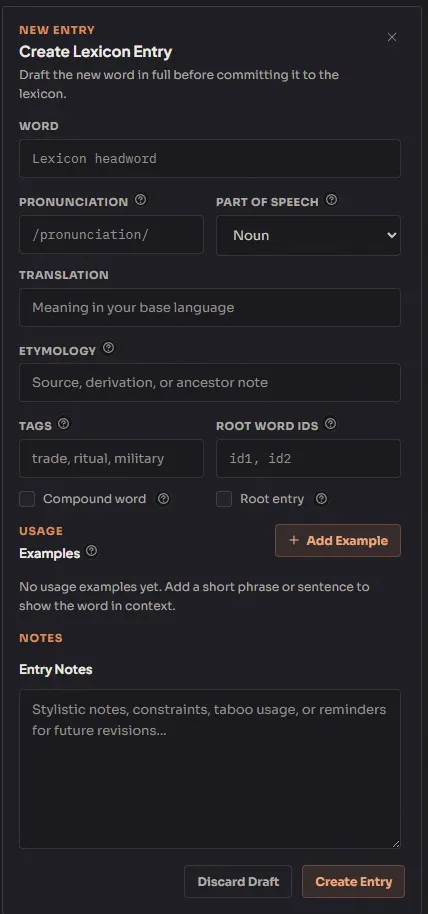
A searchable dictionary for your language. Every lexicon entry has:
- Word and pronunciation. The word itself plus how to say it.
- Part of speech. Noun, verb, adjective, adverb, pronoun, preposition, conjunction, interjection, determiner, particle, numeral, classifier, affix, or other. Standard linguistic categories.
- Translation — the meaning in your working language (usually English).
- Etymology — origin and derivation notes. Where does this word come from? What proto-root, if any? What historical sound changes got it to its current form?
- Root word links — reference other lexicon entries this word derives from. Useful for building morphological families.
- Usage examples — conlang phrase paired with translation. Shows the word in context.
- Tags for categorization.
- Compound word and root word flags for structural identification.
Search by word text, filter by part of speech, paginated browsing. A mature conlang lexicon can run to thousands of entries; the search system scales.
Grammar rules
Section titled “Grammar rules”Define morphological and syntactic rules for your language. Grammar rules cover verb conjugation patterns, noun case systems, syntax constraints, honorific registers, tense and aspect markers — anything that’s a pattern in your language rather than an individual word.
Rule categories:
- Morphology — how words build internally.
- Syntax — how words combine into sentences.
- Case — grammatical case marking systems.
- Tense — time marking.
- Aspect — event duration and completion marking.
- Mood — modality marking.
- Number — singular, dual, plural, paucal, etc.
- Gender — grammatical gender systems.
- Honorific — politeness level systems.
Each rule has a name, description, pattern, and example glosses (input form, output form, interlinear gloss). Examples are the part that makes grammar rules useful — linguistic patterns are easier to understand from worked examples than from rule descriptions.
Morphemes
Section titled “Morphemes”Catalog the smallest meaningful units of your language. Every lexicon entry is usually made of one or more morphemes; tracking morphemes separately lets you reuse them across many words.
Each morpheme has:
- Morpheme text and meaning.
- Type. Prefix, suffix, infix, circumfix, clitic, or particle.
- Category for grouping (tense markers, case markers, pluralization markers, etc.).
- Allomorphs. Variant forms of the same morpheme — the English past-tense suffix is one morpheme but realizes as “-ed,” “-d,” or “-t” depending on phonological context. Allomorphs track those variants.
Writing system
Section titled “Writing system”Configure how the language is written:
- Type. Alphabet, syllabary, logographic, abjad, abugida, or featural. English is an alphabet. Japanese katakana is a syllabary. Chinese is logographic. Arabic is an abjad. Hindi is an abugida. Korean hangul is featural.
- Direction. Left-to-right, right-to-left, top-to-bottom, or boustrophedon (alternating lines).
- Description — narrative details about the script’s history, appearance, and cultural significance.
The writing system is metadata; Ishvana doesn’t render your custom script in prose. It stores the configuration so the Legendry entry for the language can describe the script accurately.
The Language Studio includes several tools that make the conlang buildable as a working system rather than a static database.
Word generator
Section titled “Word generator”Generate new words that conform to your language’s sound rules:
- Parses your configured syllable templates.
- Selects phonemes from your inventory.
- Filters generated candidates against your phonotactic rules so the output actually sounds like your language.
- Settings — word count, min/max syllables, seed syllable, phoneme class bias.
The word generator is what you reach for when you need a new name, a new noun, a new place, and you want something that sounds authentic to your language rather than a one-off made-up word. Run it with the constraints loose when you want variety; run it tight when you want words that match an established aesthetic.
Enhanced word generation
Section titled “Enhanced word generation”Enhanced word generation uses local language helpers. The deterministic generator produces candidates; the enhancement pass then:
- Ranks candidates for aesthetic consistency with existing vocabulary in your lexicon. Words that fit the “feel” of your language score higher.
- Suggests meanings and etymologies for generated words. Useful when you want the new word to slot into your lexicon’s existing semantic space.
Enhanced word generation runs locally through Etherforce. Use it when you need quality names or when you’re trying to extend a well-established conlang consistently. The tradeoff is local processing time, not provider cost.
Translation helper
Section titled “Translation helper”A word-by-word translation tool:
- Looks up each input word in the lexicon.
- Reorders output according to the language’s configured word order.
- Reports missing words (not yet in the lexicon) so you can add them.
This is a rough translator, not a real one. It translates individual words and applies word order, but it doesn’t handle the morphological machinery that real translation needs — inflection, case agreement, tense marking, honorific register. For rough test phrases it’s useful; for real translation work you’re still doing it yourself.
Consistency checker
Section titled “Consistency checker”Validate your lexicon against your own phonotactic rules:
- Checks every lexicon word against your configured rules.
- Reports violations with the specific rule broken and an explanation.
- Catches drift between evolving rules and existing vocabulary — when you refine a phonotactic rule and realize three existing words now break it.
Usage scanner
Section titled “Usage scanner”Find conlang words in your manuscripts:
- Scans document text for occurrences of lexicon entries.
- Records context snippets and locations.
- Tracks where and how often each word appears in your writing.
Useful for answering “how many times did I use this word in the whole book?” and “where does this word first appear in the prose?” A word that shows up twice across a 90,000-word manuscript is probably not an established part of your language; a word that shows up forty times is load-bearing.
A typical build workflow
Section titled “A typical build workflow”- Create a language from the sidebar. Set name, endonym, status, word order, morphology type, and phonotactic template.
- Build the phoneme inventory — add consonants and vowels with their IPA features and romanization mappings.
- Define phonotactic rules to constrain valid syllable shapes. Start with a few broad rules and tighten as the lexicon grows.
- Add lexicon entries — start with the core vocabulary your book actually uses. Don’t try to build a complete dictionary up front. Add words as the prose demands them.
- Codify grammar rules — conjugation patterns, case systems, syntax rules. This is where real conlangs diverge from bolted-on wordlists.
- Catalog morphemes — the prefixes, suffixes, and particles that compose your words.
- Configure the writing system — script type, direction, and narrative description.
- Use the tools. Generate new words when you need them, translate test phrases, run consistency checks after rule changes, scan your manuscripts for usage.
- Build family trees if your world has multiple related languages. Set parent languages to model proto-language descent.
Building a conlang is a long project. The Language Studio doesn’t make it fast, but it makes it tractable — and the work you do on the language pays off for every future book set in the same world.