
Plot Studio
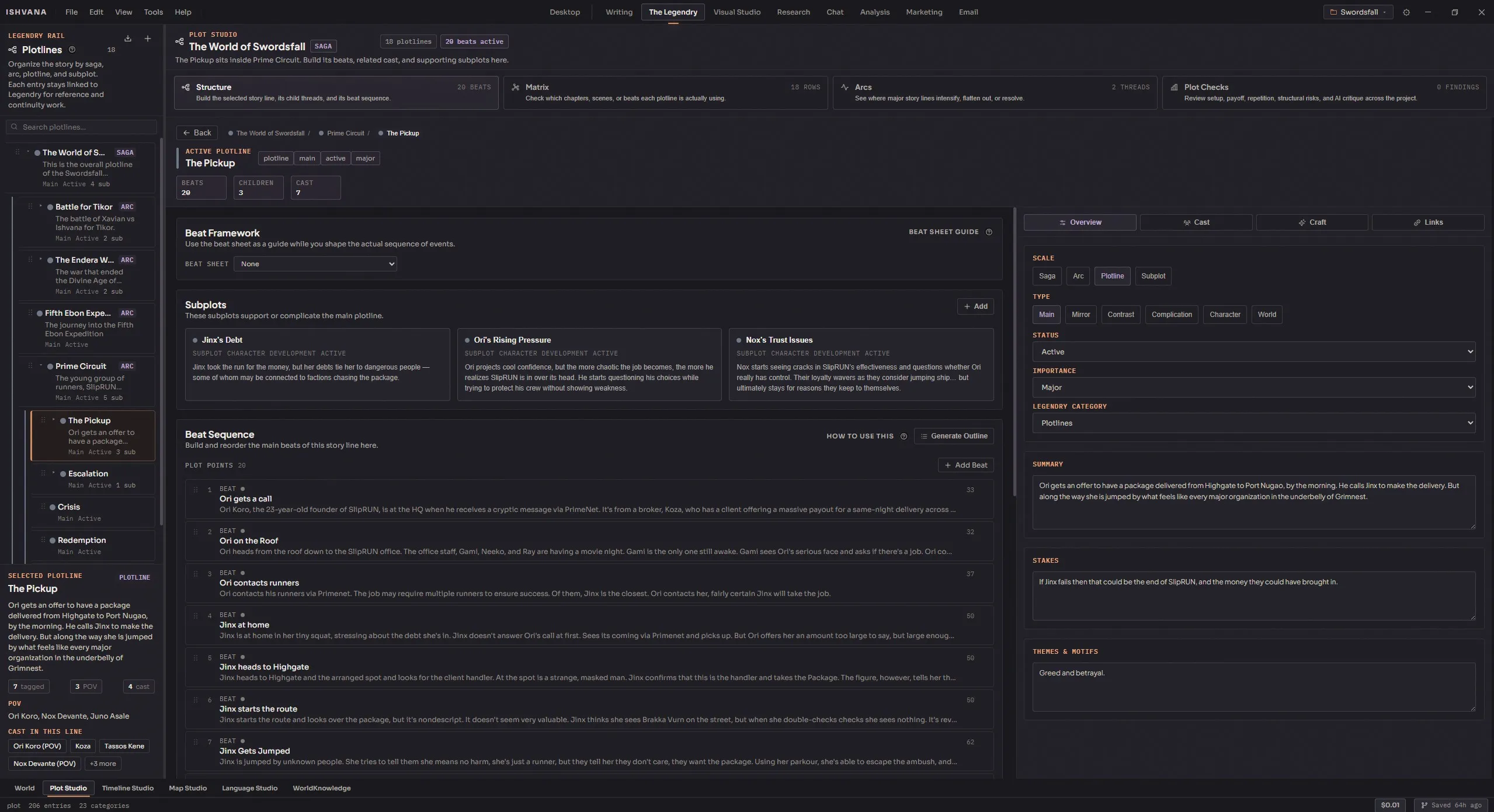
Plot is the thing most fiction writing tools treat as an afterthought. They’ll give you an outline tool that lets you list chapters. They’ll give you a notes tool where you can write freeform thoughts about where the story is going. Neither of those is really about plot. Real plot work is about tracking narrative arcs, mapping character transformation, setting up plants and making sure they pay off, managing the promises you’re making to the reader, and seeing all of it across a whole book — ideally across a whole series — without losing threads along the way. The Plot Studio is Ishvana’s dedicated answer to that. It’s a first-class module that treats plotlines as structured data, tracks beats with intensity and position, understands beat sheet frameworks, maps character transformation arcs, manages Chekhov’s guns and broken promises, and surfaces structural analysis through visualizations your outline alone can’t give you.
This page is the full reference. It’s long because plot is genuinely complicated and a thin page wouldn’t do the module justice.
Hierarchical plotlines
Section titled “Hierarchical plotlines”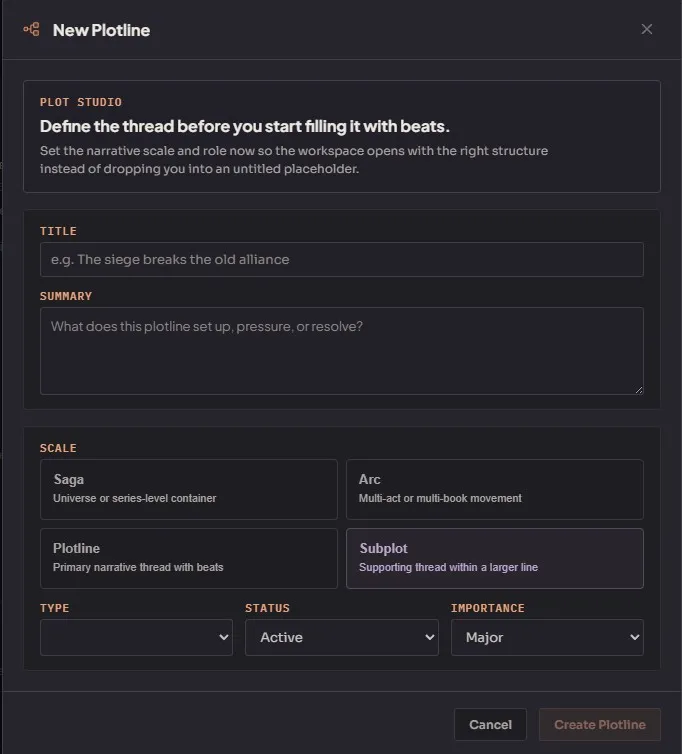
Create nested plotlines at any depth — world arcs down to subplots. Each plotline is a proper tracked entity with:
- Title and summary. Plain text fields.
- Subtype. Main, mirror, contrast, complication, character development, world building. The subtype tags the plotline’s function in the larger narrative so you can filter by it later.
- Status. Active, resolved, dormant, dropped. Updates as the plotline evolves through your writing.
- Importance. Major, supporting, or minor. Helps the analysis tools decide which plotlines deserve more attention.
- Color for visual identification across all the plot views.
- Drag reordering and reparenting via the tree. Restructure plotlines by dragging.
Every plotline you create automatically generates a corresponding Legendry lore entry, which is the quiet magic of the system. This means plotlines are searchable, taggable, referenceable from prose, and available to Lorekeeper consistency checking — same as any other lore entry. Your subplots are not separate from your world; they’re part of your world’s data.
Plot points (beats)
Section titled “Plot points (beats)”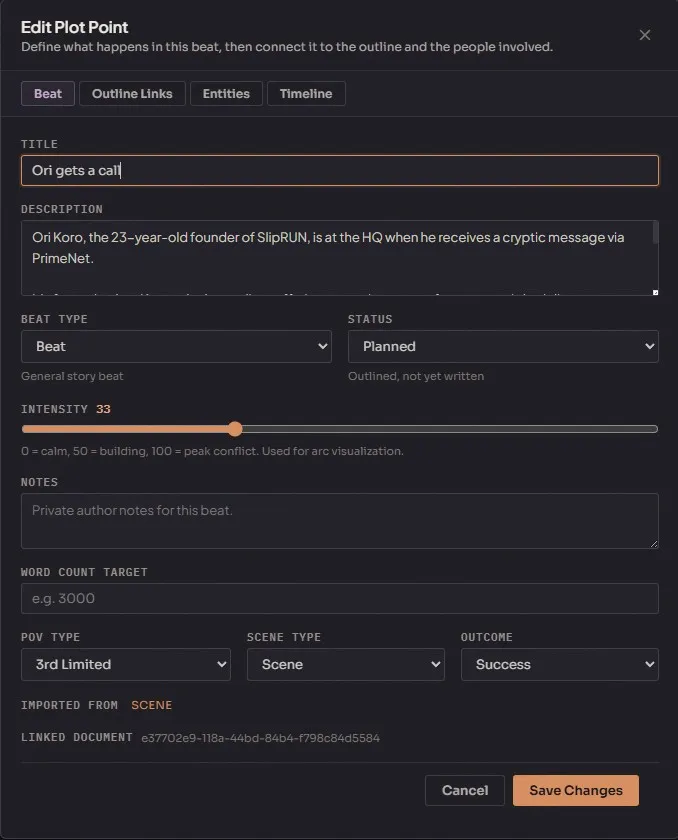
Inside each plotline, add beats. A beat is the smallest narrative unit the Plot Studio tracks — a specific moment in the plotline, like an inciting incident or a turning point. Each beat carries:
- Title and description.
- Point type. Beat, turning point, inciting incident, climax, resolution, setup, escalation, reversal. The type categorizes the beat’s narrative function.
- Intensity (0-100). How emotionally or narratively charged this moment is. Used for the arc visualization.
- Status. Planned, drafted, revised, final. Tracks how far along the beat is in your actual manuscript.
- Word count target. Optional expected length for the beat.
- Beat sheet position. Optionally maps to a framework beat (see below).
- Reorderable within the plotline via drag.
Beat sheet frameworks
Section titled “Beat sheet frameworks”Assign a beat sheet framework to any plotline and Plot Studio will analyze coverage against it. Six built-in templates:
- Save the Cat — Blake Snyder’s fifteen beats.
- Hero’s Journey — Joseph Campbell’s monomyth structure.
- Three-Act Structure — the classic setup / confrontation / resolution.
- Five-Act Structure — Freytag-style five-act division.
- Seven-Point Story Structure — Dan Wells’s tight plotter’s framework.
- Fichtean Curve — rising tension through successive crises.
You can also create custom templates with named beats, target percentages of story position, and act numbers. Useful when you’re writing in a tradition that doesn’t fit any of the ship-with presets — romance beats, mystery structure, episodic genre fiction, whatever.
The coverage analysis is where beat sheets get interesting. Assign a framework and the analysis shows which framework beats are fulfilled by your actual plot points and which are missing, with deviation percentages from the target position. A plotline that’s missing its midpoint beat is something you probably want to know about before you finish the draft.
Character arcs (Weiland’s framework)
Section titled “Character arcs (Weiland’s framework)”Track character transformation arcs per plotline using K.M. Weiland’s structural framework. Every arc has five defined elements:
- The Lie — what the character believes at the start. The misconception that needs to break.
- The Ghost — the wound or backstory that created the Lie. Why the character believes it.
- The Want — the external goal the character pursues because of the Lie. Usually wrong but feels right.
- The Need — the internal truth the character has to discover. What they actually need, as opposed to what they want.
- The Truth — the realization that completes the arc. The moment the Lie breaks and the Need becomes clear.
Each arc is tied to a specific plotline and a specific character. A single character can have different arcs in different plotlines, and a single plotline can track arcs for multiple characters. This is how you handle a novel where the protagonist and antagonist both change over the course of the story — different arcs, potentially competing transformation directions.
Plants and payoffs (Chekhov’s gun tracking)
Section titled “Plants and payoffs (Chekhov’s gun tracking)”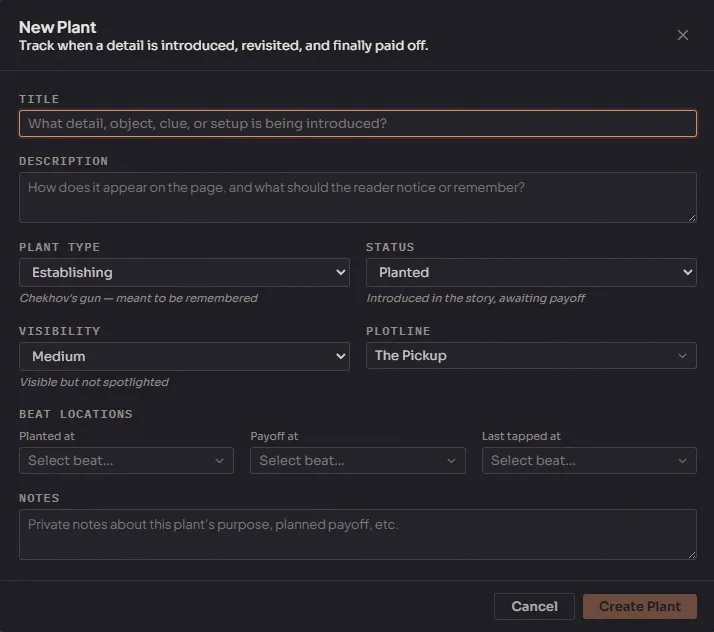
Track narrative setups and their resolutions. A plant is a piece of story that’s been introduced but hasn’t yet paid off — Chekhov’s famous gun on the wall in act one, waiting to fire in act three. A payoff is the resolution. A tap is an optional reminder or escalation in between — the gun gets mentioned again at the midpoint, which keeps the reader aware of it.
The tracker handles:
- Plant — the setup. Create an entry with a description of what’s being planted and where.
- Tap — mid-story reminders or escalations. Optional but useful for longer plants.
- Payoff — the resolution. Creates the pairing with the original plant.
- Status tracking. Planted, tapped, paid off.
- Orphan detection. Find plants that were introduced but never paid off — the most common class of narrative failure in long books.
- Freshness and staleness reporting. How long it’s been since a plant was last touched. Helps identify plants the reader has probably forgotten about by the time payoff comes.
Promises (Sanderson’s framework)
Section titled “Promises (Sanderson’s framework)”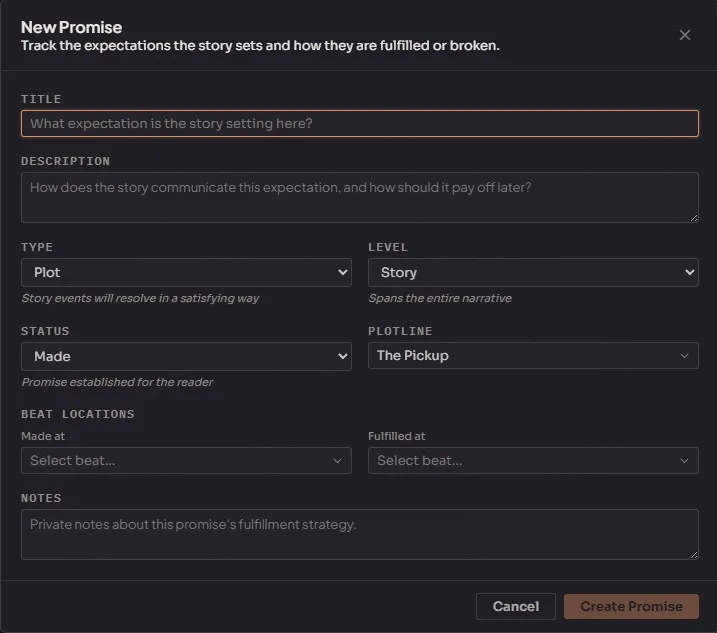
Track narrative contracts with the reader. A promise is a specific implicit commitment your book makes in its early chapters — and readers will judge the book on whether it delivers on those promises by the end. Brandon Sanderson talks about this in his lectures and the Plot Studio implements his framework.
- Promise types. Tone, genre, plot, character. Each captures a different dimension of the reader contract.
- Scope levels. Story, act, scene. How broad the promise is.
- Status. Made, kept, broken, evolving. Evolving is for promises that change meaning as the story develops.
Filter and review promises by type, level, or status. A broken promise triggers an alert on the Desktop tab, and the Lorekeeper will flag prose that contradicts a kept or evolving promise.
Entity tagging
Section titled “Entity tagging”Tag characters, locations, and factions to plotlines and individual plot points:
- Plotline-level tags. A character tagged as involved in a plotline overall. Useful for the “who is in this plotline” view.
- Beat-level tags. A character tagged as appearing in a specific beat. More granular and feeds the entity freshness reporting.
- Role descriptions. A character can be tagged with a role — “protagonist,” “antagonist,” “mentor,” “foil” — and locations can be tagged with roles like “setting” or “destination.”
- Untag when entities leave a storyline.
Entity tagging is what powers the Tap Report visualization (see below) and the Lore ML analysis of entity importance across plotlines.
Outline integration
Section titled “Outline integration”Bridge plot structure and manuscript structure. The Plot Studio and the Outline are separate systems but deeply linked:
- Link plot points to outline nodes. Map beats to specific chapters, scenes, or other structural units. The link is bidirectional — click from the plot point to the scene, or click from the scene to the plot point.
- Generate outline from plotline. Auto-create an outline skeleton from a plotline’s beats. Useful when you’ve been doing plot work first and want to turn it into structural scaffolding.
- Generate plotline from outline. The reverse — create a plotline structure from existing outline nodes. Useful when you’ve been outlining first and want to formalize the plot layer.
Changes in either system stay synced. Rename a beat in the Plot Studio and the linked outline node updates.
Visualizations
Section titled “Visualizations”A plotline-by-chapter grid showing which plot threads are active in each chapter. Each cell indicates which plot beats land in which structural units. See at a glance whether your plotlines are well-distributed across the book or clumped into specific sections.
This is the view that answers “does my subplot actually show up enough in the middle third?” A matrix with a big gap in the middle means the subplot disappears for a hundred pages and readers will feel it.
An intensity-over-time line chart showing the emotional trajectory of your plotlines. Plot points are placed on the X axis by order and on the Y axis by intensity. The resulting shape tells you the rising action, the climax, and the falling action of each plotline.
A well-shaped plotline has a recognizable arc — rising tension to a climax, then a release. A flat plotline is a plotline that isn’t working. A plotline with two peaks might be intentional (dual climax) or might be a structural problem.
Entity freshness reporting. How recently each tagged character, location, or faction was mentioned, used, or advanced. Identifies entities that have gone stale — characters who disappeared for chapters, locations forgotten, setups gathering dust.
The Tap Report is the best view for catching the “wait, what happened to this character” problem. Most readers notice when a character introduced early vanishes for forty pages. The Tap Report notices it before the readers do.
Document annotations
Section titled “Document annotations”Plot-specific inline annotations in the writing editor. When you’re working in a manuscript linked to plot points, annotations appear as cards between paragraphs showing:
- Plotline badge for the relevant plotline.
- Beat position — where this paragraph sits in the plot structure.
- Plant status for any plants active in this passage.
- Entity names tagged to the current beat.
Actions per annotation:
- Apply — incorporate the annotation’s guidance into the text.
- Resolve — mark the annotation handled.
- Convert — turn an annotation into a new plot point.
Filter annotations by type or status.
Plot analysis Agent
Section titled “Plot analysis ”Two kinds of analysis run against your plot data:
Deterministic checks
Section titled “Deterministic checks”Automated structural analysis with no model involvement:
- Dropped threads. Plotlines or beats in active or planned status that haven’t been touched in a while.
- Pacing issues. Uneven beat distribution across outline nodes.
- Unresolved beats. Plot points still in planned status late in the structure.
- Orphaned plants. Setups with no payoffs.
These run fast and return hard, actionable results. Use them on every major draft.
Agent-driven analysis
Section titled “Agent-driven analysis”Hawken-driven narrative feedback:
- Structural notes on plotline design.
- Observations about missing beats or underdeveloped arcs.
- Cross-plotline coherence checking.
This analysis is slower and more expensive but catches subtler issues the deterministic checks can’t — like “this plotline’s stakes don’t feel commensurate with its importance” or “this character arc doesn’t land because the Want and Need aren’t actually in conflict.” The findings come back as notes you can act on, not edits applied to your structure.
Timeline linking
Section titled “Timeline linking”Connect plotlines to Timeline Studio swimlanes:
- Link a plotline to one or more timeline plotlines (many-to-many relationship).
- Bidirectional sync — changes propagate between Plot Studio and Timeline views.
- Unified temporal and narrative view of your story.
Timeline Studio and Plot Studio are separate modules because they answer different questions — when something happens versus what role it plays in the story — but linking them gives you a combined view where you can see both dimensions at once.